1. Cloning PSD
LaThe proceduracloning diprocedure clonazioneinvolves consisteexporting nell'esportare la configurazione delthe PSD sull'configuration to the SD card medianteusing the PSD Servo Manager.
-
AssicurarsiEnsurechethatilthe source PSDdiandoriginetheetargetquelloPSDdihavedestinazionetheabbiano lo stessosame order code -
FormattareFormatlathe SDCardcardin formatoto FAT32utilizzandousingil softwarethe SD Memory Card Formatter software -
ConnettersiConnectalto the PSDmedianteusingil softwarethe PSD Servo Manager software -
AssicurarsiEnsurechethatilthe drivesiaisDISABILITATODISABLED -
InserireInsertlathe SDCardcardnellointo the C11 slotC11locatedpostoonsulthefrontalefrontdelof the PSD -
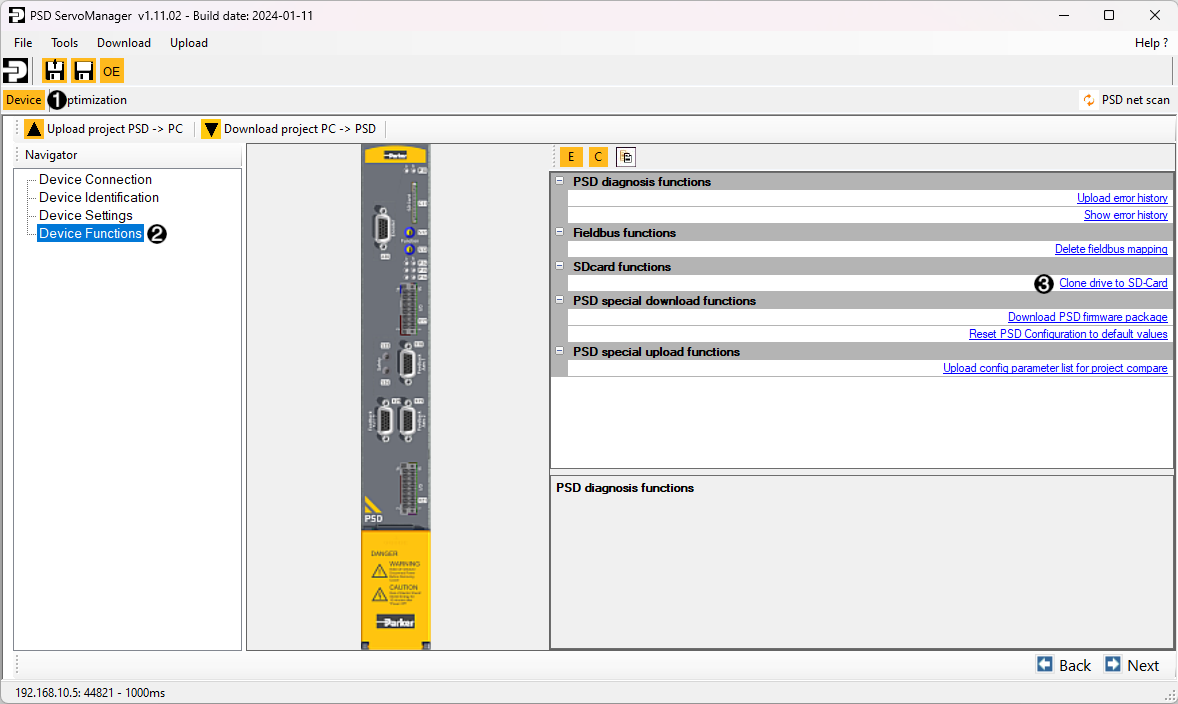
SuIn PSD Servo Manager,nellagoschedato the device tab (1),selezionare la voceselect Device Functions (2)nellaincolonnathedileftsinistra.column,Scegliereandquindithenla vocechoose Clone drive to SD-Card (3) -
CompletareCompletelatheproceduraguidedguidataprocedure